eHub
- 4.2
- Rating
- 1.00M
- Installs
- Free
- Price

 Analysis by App-foxy
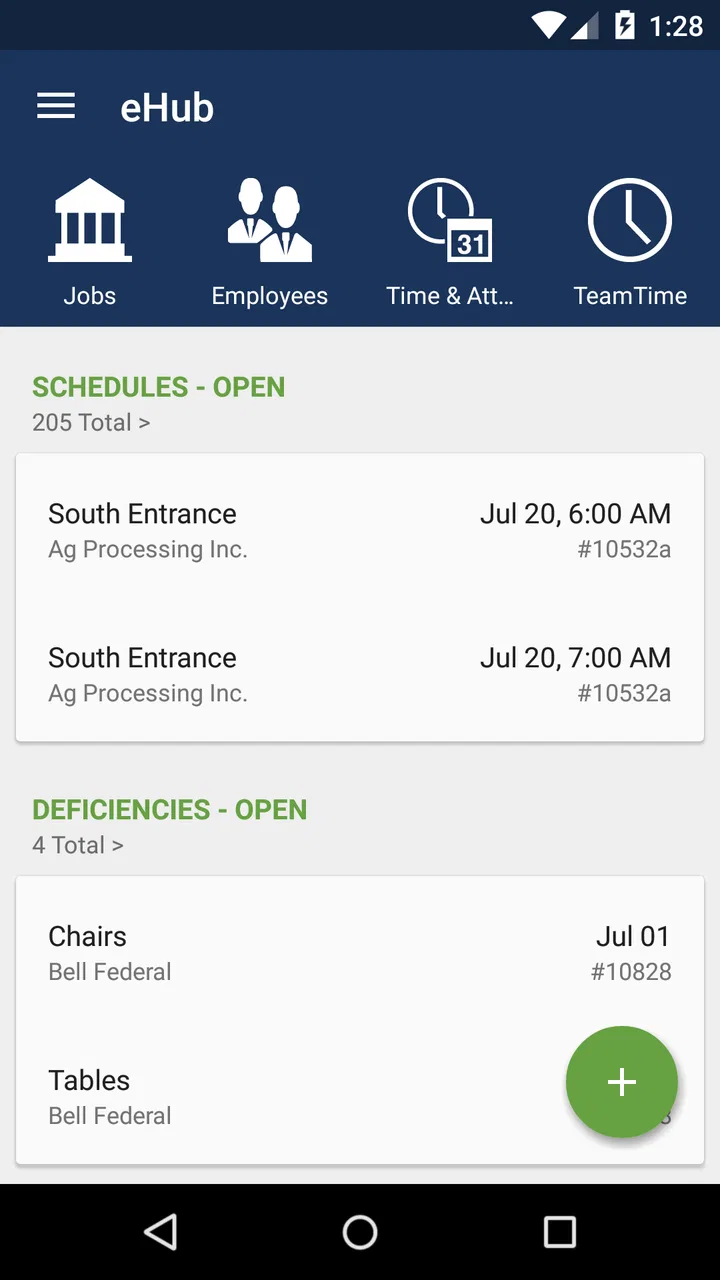
When work is split between offices, buildings, shifts, and customer sites, the hardest part is often not the job itself. It is getting the right information from the right person without another phone call, email chain, or visit to an office. That is where eHub makes sense. It is a business app from TEAM Software built around self-service for employees and customers of building service companies and security contractors.
I see it as a practical companion to an employer’s existing work process rather than a complete business-management system. The app is free to install, rated for Everyone, and available for devices running at least iOS or Android version 12. Its current version is 4.65.0, and its long presence in the stores is reflected in a 4.2 average from around 20 thousand ratings, with more than a million installs. Those figures suggest that it is used at a meaningful scale, but they do not change the most important point: how useful it feels depends heavily on how well the company has configured and adopted it.
From a work request to a completed handoff
I use the handoff as the point to judge whether eHub is genuinely saving effort: a request should be clear enough for the next person to act on, and the user should know what to do if the matter cannot wait. In the section that follows, I look at how shared access and role boundaries affect that routine, especially when a device is used around a household.
You May Also Like

 Blood Strike: 2.5 Anniversary
Blood Strike’s Loadouts Turn Every Drop Into a Tactical Gamble
A close look at Blood Strike’s custom loadouts: how fast access to signature weapons reshapes its battle royale rhythm, rewards preparation, and narrows the gap between fights.

 Pandora - Music & Podcasts
Pandora’s Music Is Easy to Start, but Harder to Recover
Pandora’s strength is its low-effort path from a seed to a station. Its weak spot is how much confidence it asks you to place in connection, setup, and quiet recovery.

 8 Ball Pool
 Is Built on Rivalries, Rematches, and Routine
A close look at the rivalries, rematches, shared routines, and unanswered safety questions that turn a quick pool match into a persistent mobile community.

 Samsung Music
’s Quiet Strength Is Playing What You Already Own
Its reach comes less from spectacle than from dependable access to a personal library. That simplicity is both the app’s strongest retention engine and its ceiling.

 AccuWeather: Weather Radar
AccuWeather Review: A Quick, Clear Forecast for Everyday Decisions
For everyday plans, the best forecast is the one you can understand quickly. AccuWeather makes rain timing, radar, and local conditions easy to act on, with a few trade-offs.

 Hill Climb Racing
Why Hill Climb Racing Still Turns Crashes Into One More Run
A tiny car, a bumpy hill and one more upgrade: Hill Climb Racing keeps resurfacing because its simple chaos makes every near-miss feel personal.
More From Our News Desk



The starting condition: information is scattered
Imagine a cleaner finishing a shift at a customer location, a security officer needing to check a work-related detail, or a customer wanting to communicate with the contractor handling a site. In a traditional setup, each person may use a different route. One person calls a supervisor, another sends an email, and someone else waits for an office administrator to respond. That approach can work for occasional questions, but it becomes tiring when the same kinds of requests happen every day.
eHub is designed for the point where those people need a shared self-service doorway. Employees can use it as a work-facing mobile channel, while customers can use the parts made available to them by their service provider. This distinction matters. It is not simply a generic notes app or a personal task manager. Its value comes from connecting the user to an organization that already uses TEAM Software’s business tools and has enabled the relevant experience.
That last detail is the first practical check I would make before recommending it. Installing the app alone does not create a useful account or guarantee that every function will appear. Your employer or contractor needs to support the service, and your access is tied to that organization’s setup. If you are looking for an independent app to organize freelance work, track personal jobs, or manage a small business without an associated provider, this is probably the wrong choice.
Getting started without treating it like a general-purpose app
The first step is to obtain the correct access details from the organization you work for or the contractor you deal with. I would not assume that a work email, phone number, or customer reference automatically works unless the organization has told you to use it. This is one of the less obvious realities of self-service platforms: the app can be technically installed and still be unusable until the account relationship is set up on the business side.
Once access is available, I would approach the first session as an orientation exercise rather than immediately tapping through every screen. Look for the areas that relate to your role, then identify which actions are meant for routine self-service and which still require a supervisor, dispatcher, payroll contact, or customer-service representative. That distinction prevents a common frustration: assuming that a button or menu is missing when it is actually restricted by the organization’s configuration.
The app’s business focus also means that a clean, simple screen does not necessarily mean a simple workflow. A request may depend on information held by another team. For example, an employee may be able to submit or view something in the app, while a manager must review it before the matter is complete. I find it useful to think of eHub as the front door to a process, not always the person who makes the final decision.
Following the workflow step by step
A realistic everyday scenario might begin with a contract employee finishing a shift at a customer site. Instead of waiting until the next office visit to deal with a work question, the employee opens the app, signs in, and checks the available self-service options. The employee then uses the relevant area to provide or retrieve the information supported by the organization. The important improvement is not a flashy feature; it is moving the first action closer to the person who actually needs to take it.
For a customer, the same pattern can begin with a question about the service relationship. The customer enters through the customer-facing side made available by the contractor, supplies the necessary context, and sends the request into the company’s process. That can be more orderly than sending a message to a general inbox because the request starts inside a channel intended for the business relationship.
My advice is to prepare before submitting anything that affects a shift, site, or service request. Check the selected role or account, read the wording of the request, and make sure the details are complete. Self-service is fastest when the first submission is clear. If a manager or office team has to ask for missing information, the app has not removed the delay; it has only moved the first part of the delay onto a smaller screen.
Another useful habit is to treat the app as a record of the action you have taken, not as proof that the action has already been approved or resolved. In business workflows, submission, review, assignment, and completion can be separate stages. I would keep an eye on any status or follow-up information the organization exposes, and I would contact the appropriate human representative if the matter is time-sensitive and the app does not show a clear outcome.
Where the handoffs happen
The strongest part of this kind of app is the handoff between people who otherwise work at a distance. An employee can start a request away from the office. A supervisor or administrator can then handle the next stage through the company’s connected workflow. A customer can also begin communication without needing to know which internal department should receive it.
That sounds simple, but handoffs are where many workplace apps become confusing. The person submitting a request may not know who owns it next. The person receiving it may need information that was not included. A customer may expect an immediate answer even though the contractor needs to coordinate with a field team. eHub can make the starting point more consistent, but it cannot eliminate the organization’s internal responsibilities.
I would therefore judge the experience by the clarity of the handoff, not just by the number of available menus. A good setup tells the user what happens after an action and what kind of response to expect. A weaker setup leaves the user wondering whether the request was sent, who is reviewing it, or whether another channel is still necessary. That difference is usually caused by the employer or contractor’s process, but it directly affects how the app feels.
For managers and administrators, the benefit is potentially even more practical. A self-service channel can reduce repetitive questions that do not require a personal conversation. It can also give employees and customers a more consistent place to begin. However, the organization still needs to maintain its underlying records and respond promptly. If the office ignores requests submitted through the app, users will quickly return to calls and messages, regardless of how polished the mobile interface is.
The result: less chasing when the setup is good
When the workflow is configured properly, the result is a shorter path from question to action. An employee can handle a routine work-related task without traveling to an office. A customer can reach the contractor through a channel connected to the service relationship. The company receives requests in a more structured way, which can make it easier to route them to the right internal person.
That is the real reason I would recommend eHub to someone whose employer or contractor already uses it. It is not necessarily exciting, but it can remove small pieces of friction from work that happens across multiple locations. For people who spend most of their time in the field, that convenience can matter more than a long list of advanced tools.
The app also has an advantage over ordinary alternatives such as personal email, text messages, or a general messaging service. Those tools are familiar, but they often separate the conversation from the business record. They can make it difficult to know whether a request reached the correct team, and they encourage people to use personal contact details for work matters. A dedicated self-service channel is more appropriate when the organization needs a repeatable route for employees and customers.
On the other hand, a general communication tool may still be better for urgent, informal coordination when everyone already knows one another and the company has not made eHub part of its daily process. I would not use a self-service app as a substitute for emergency contact procedures or immediate operational communication unless the organization explicitly says to do so. Convenience should not be confused with urgency handling.
Three practical insights that are easy to miss
First, the app’s usefulness is role-dependent. An employee and a customer may both see eHub, but they are not necessarily entering the same workflow or receiving the same options. If you compare your screen with a colleague’s and notice differences, that does not automatically indicate a fault. The organization may be presenting different self-service paths based on the relationship each person has with it.
Second, the best time to use it is before a routine issue becomes a deadline problem. A question about a shift, a site, or a service request is easier to route when there is time for the responsible team to review it. Waiting until the last moment can expose the limits of any self-service system, especially when the next step belongs to a human supervisor or office team.
Third, the app works best when users write for the next person in the chain, not only for themselves. A short message that says “this is wrong” may make sense to the sender but force an administrator to ask several follow-up questions. Including the relevant location, work context, and desired outcome—when the available form allows it—can reduce the back-and-forth. This is a workflow improvement rather than a hidden button, and it is one of the most valuable habits for getting results from eHub.
A fourth trade-off is worth noting: centralization can improve traceability, but it can also make users dependent on the organization’s account setup. With email, you can often contact someone outside a particular platform. With eHub, the experience is more controlled and therefore more consistent when it works, but less flexible when your access, role, or employer relationship changes.
Where the flow breaks
The most important limitation is that this is not a universal business app. Its usefulness depends on participation by the employer, building service company, or security contractor. If your organization does not use the relevant TEAM Software environment, there may be little you can do after installation. This is the first reason someone should skip it: do not download it expecting a blank workspace for independent use.
The second limitation is that self-service does not guarantee instant resolution. A submitted item may still need review, approval, scheduling, or a response from another team. Users who expect every action to produce an immediate answer may find the process slow, even when the request has been correctly entered. I would pay attention to the organization’s instructions about urgent matters and keep a direct contact method available for situations that cannot wait.
The third issue is the possibility of uneven experiences between organizations. One contractor may build a clear, useful workflow, while another may expose fewer options or provide less guidance. That makes it difficult to judge the app only from the icon or the installation screen. In practice, the quality of the surrounding business process is part of the product experience.
There is also a clear boundary between eHub and tools designed for broader collaboration. Teams that need project boards, document editing, live group chat, sophisticated scheduling, or independent customer relationship management will likely need a different solution. eHub is better understood as a focused employee and customer self-service channel than as a full replacement for a workplace suite.
Who should use it and who should look elsewhere
I would recommend it to employees of building service companies and security contractors who have been directed to use it, particularly those who work away from a central office. It can also suit customers who want a structured way to interact with a participating contractor. The free price removes a common barrier for individual users, and the Everyone content rating makes it broadly approachable from an age-classification standpoint.
I would be more cautious about recommending it to someone who has not received account instructions, someone seeking a personal work organizer, or a small business looking for a complete operations platform. Those users may be better served by a general task app, a team communication service, an email workflow, or a dedicated business-management product chosen for their own needs.
For an existing user, my practical recommendation is to install it only after confirming the correct sign-in route with your organization, learn which actions are self-service, and identify the proper backup contact for urgent issues. Use complete details in every request, check whether the item has moved beyond submission, and do not assume that a visible option represents the entire process behind it.
My overall assessment
eHub succeeds when its purpose is kept in view. It brings employees and customers closer to the business process that serves them, reducing the need to rely on scattered calls and messages for routine matters. I like the idea of having one work-focused entry point, especially for people who move between sites and do not have easy access to an office.
At the same time, I would not describe it as a magic fix for workplace communication. The handoff after submission, the clarity of the organization’s instructions, and the speed of the responsible team all shape the final result. If those parts are weak, the app may feel like an extra step rather than a shortcut.
With over a million installs and a 4.2 average from around 20 thousand ratings, it is clearly established enough to deserve consideration by participating organizations. My final view is straightforward: this is a useful self-service doorway, not a complete business-management replacement. If your employer or contractor already supports it, it is worth learning because it can make routine requests easier to start and track. If you need an independent productivity tool or instant emergency communication, choose something designed specifically for that job instead.
FAQs for eHub
01What is eHub, and what can I use it for?
eHub is a digital platform designed to bring selected services, information, and account tools together in one place. Depending on the version available in your region, you may use it to view updates, manage profile details, access service-related features, and communicate with an organization or provider. The exact tools can vary, so checking the app description and supported region before downloading is recommended.
02Is eHub free to download and use?
The eHub application may be free to download, but some services accessed through it can depend on your organization, subscription, membership, or account type. The app itself may not charge a separate fee, while certain transactions, premium options, or third-party services could involve costs. Review any pricing information, payment screens, and terms carefully before confirming a purchase or request.
03Do I need an account to use eHub?
Many of eHub’s useful features require users to sign in with an existing account or create one during the first setup. Registration may involve an email address, phone number, organization code, or other verification details. Some public information may be available without signing in, but account-based tools generally require authentication to protect personal data and provide access to the correct services.
04What permissions and personal information does eHub require?
The permissions requested by eHub depend on the features enabled in your version of the app. It may request access to notifications, camera functions, files, location, or contact details when those tools are needed. Before accepting, review the permission explanations and the developer’s privacy policy. You can usually manage permissions later through your Android or iOS device settings.
05Is eHub available for both Android and iPhone, and what should I check before installing it?
Availability can differ by country, device, and operating-system version, so confirm that the official eHub listing supports your Android phone or iPhone before downloading. Check the developer name, recent reviews, update date, storage requirements, and privacy information to avoid unofficial copies. A stable internet connection may also be necessary for sign-in, synchronization, and certain in-app services.
Pros
- Centralizes multiple digital services in one convenient platform.
- Simple interface makes navigation quick for new users.
- Useful account tools help manage personal information efficiently.
- Reduces the need to switch between separate service applications.
- Convenient access to updates and support options in one place.
Cons
- Some features may depend on your region or available eHub services.
- Performance can vary on older phones or slower internet connections.
- Users may need to create an account before accessing key features.
- Occasional updates may change the layout or location of familiar tools.
- Privacy-conscious users should review permissions and data policies carefully.

eHub
Gallery